











The Champion Bet mobile app brings sports betting, live markets and casino games into one Android application, without requiring a browser tab. An APK is the installer file Android uses for an app: it is similar to a package delivered by an app store, but you download and open it manually.
This page explains what the file does, how to install it on a phone or tablet, how to check for an update, and what to do if installation fails. Betting is for players aged 18+.
Champion Bet APK Download
APK stands for Android Package. It is an archive containing the app code, images and configuration files. When you approve installation, Android checks the package, places the application in protected storage and adds its icon to the launcher.
Manual installation can be useful where a device has no access to a relevant app store or where betting apps are not listed in a local catalogue. Keep the downloaded file only until installation is complete, then remove it if you need to free storage.
Use the official application rather than a copy from a file-sharing service. It works with the account system on the Champion Bet website, allowing balances, bet history and verification status to remain associated with the same account. Unofficial packages can be outdated or altered, so they are not a reliable way to access payment or account functions.
Champion Bet App Latest Version
Each new release replaces the previous build rather than running beside it. Updates can correct reported faults, adapt screens when services change, and improve stability or memory use. These changes may be especially noticeable on phones with limited storage or older hardware.
An outdated build may show minor problems first, such as a market that does not load, a deposit form that remains open, or a login screen that loops. Check for a newer file before troubleshooting a recurring issue. Installing the current package over the existing app normally preserves the app data already stored on the device.
How to Install Champion Bet APK
The process usually takes a few minutes on a stable connection. You need the completed file, enough free storage, and permission for the browser or file manager you use to open the package. Root access, a computer and third-party installation tools are not required.
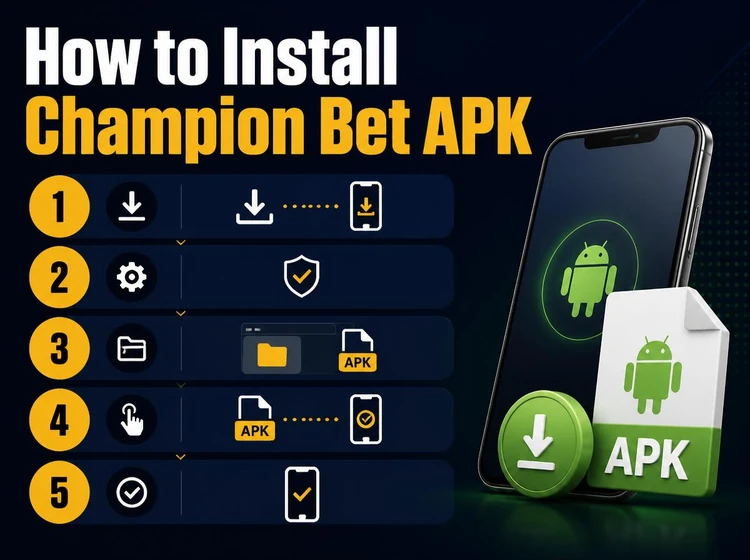
Follow the steps in order. Android may ask for confirmation more than once when an application was not delivered through an app store; this is normal and lets you decide which source may install the file.
- Step 1: Download the APK to your phone and wait until the transfer finishes. A partial file can fail during parsing or installation.
- Step 2: Allow installation from the source you are using. On Android 8 and newer, the prompt usually appears after you tap the file and permission is granted separately to the browser or file manager. On older devices, look for the setting under Security.
- Step 3: Open the completed file from the notification panel or Downloads folder, review Android's installation screen and confirm the installation.
- Step 4: Open the application from its new icon. You can choose whether to allow notifications, which may be used for results or pending-bet alerts.
- Step 5: Log in with existing account details or register if you are new. Existing users can also sign in to their account on the site using the same credentials.
Application Features
The betting area provides pre-match and live markets for football, basketball, tennis and other available sports. The bet slip remains accessible while you browse, so selections can be reviewed before confirmation. Where available for a selection, cashout is shown in the bet details.
Casino games are presented in a separate area with search and category filters. Account tools may include regional deposit and withdrawal methods, transaction records, open and settled bets, and profile or verification details. Notification and interface settings can help reduce unwanted alerts and adjust options such as odds format or language.
Safety and Updates
Get the installer from the operator's official source rather than from an unknown upload. Before confirming installation, read the permissions shown by Android and cancel if they appear unrelated to an app's normal operation. Keep Android itself updated where your device supports it.
After installation, check that the app appears in Settings under Apps with the expected name and a recent installation date. Use a unique password for the account, lock your phone when it is unattended, and log out on shared devices. The privacy policy explains how information is handled.
Troubleshooting
Installation failures commonly result from an incomplete download, a missing installation permission, insufficient storage, or an Android version below the package requirement. Delete a damaged file and download it again before trying more complex fixes. Restarting the phone can also clear a stalled installer process.
If the app installs but closes at launch, clear its cache in Android Settings and reopen it. When a problem begins immediately after an update, reinstalling the current file can rebuild data that did not migrate correctly. Very old devices may not support the current build; in that case, the mobile website can still be opened in a browser.
Champion Bet APK Download: Summary
The app offers direct access to available markets and keeps account activity linked to the website. Install only an official file, review the Android prompts, and check for updates regularly. Set personal limits and use responsible gambling tools if betting is no longer entertainment.
FAQ
It is the Android installer file for the Champion Bet mobile application. The package contains the app code and required resources, and Android uses it to install the app directly on a device. Once installed, it can provide access to available sports markets, live betting and casino games without opening a browser.
Download the APK from the operator's official source and wait for the transfer to finish. Open the file, allow installation from that browser or file manager when Android asks, and confirm. The application icon should appear when installation is complete, after which you can log in or create an account.
Installation is safest when the file comes from the official source and Android's permission screen looks appropriate for the application. Avoid copies from file-sharing sites because they may be altered or outdated. After installation, check the app name and installation date in Android Settings before entering account details.
Download the current APK and install it over the version already on your device. In most cases, this keeps your account session, settings and app data in place, so removing the old version first is unnecessary. Check for an update when you notice loading issues or before using the app after a long break.
Compatibility depends on the requirements of the current package, so very old Android devices may not be supported. Leave enough free storage for the installer, the application and its cache; a few hundred megabytes is a practical minimum. A stable connection helps prevent a corrupted or incomplete download.
First delete the downloaded file and obtain it again, as incomplete transfers are a common cause of errors. Then confirm that the browser or file manager has permission to install unknown apps and free storage if necessary. If the app installs but does not launch, clear its cache, restart the phone and try again.